Active vs non-active counting & logging · commented 25 September 2026 · nothing built yet
Live Project — the task list
Everything the document asks for, written as tasks. It covers when a capturer counts as actively capturing, new defaults for the pace settings, and changes to the top bar, the Team Performance panel, the capturer card and the capturer detail. Most of the asks are comments pinned to screenshots, so each group shows the screenshot with its comments under it.
- Tasks
- 32in seven groups
- Comments
- 1510 pinned to screenshots
- Removals
- 7and one chart replaced
- Open questions
- 105 in the doc, 5 from the comments
Speed is measured against active time only, and the screens get simpler. A pause of more than 5 minutes is a break, with no pace multiplier and no room-change rule. A day ends when the team presses We are done, or once every room is complete, processing has finished and an hour has passed. The capturer detail loses its repeated tiles and gains an idle-time split and a line chart.
When someone is not countinganalytics · T1–T5
The document lists these as a chain: each step needs the one before it. A capturer is not actively counting while any of them holds.
- T1Not counting until they are set up: the app is open, a facility is chosen, Add Inventory is selected, and a floor, department and room are chosen.rule
- T2Not counting in a room when the camera has been idle for 1.25 min, or there have been no captures for 5 min.1.25 min is marked as a placeholder (Q9).rule
- T3Allow their breaks: a 45 min lunch, a 15 min break and a second 15 min break.rule
- T4Don’t hold audit time against them: each person is audited 5 times, and they may sit on the camera screen while the supervisor audits on their own phone.The sentence in the document stops half way (Q8).rule
- T5Not counting while they are on the Audit screen.rule
App open, camera idle, the Audit screen, a locked phone, another app, a phone call — only the phone knows these, so this group needs the mobile app to report them, not just the web dashboard. The document leaves five questions about it open: Q1–Q5.
New settings defaultspace settings · T6–T13
The screenshots show the settings with new values typed over the current defaults, marked Custom. The comments say which to keep and what to drop.
Breaks inside a room5 min typed over the 10 min default
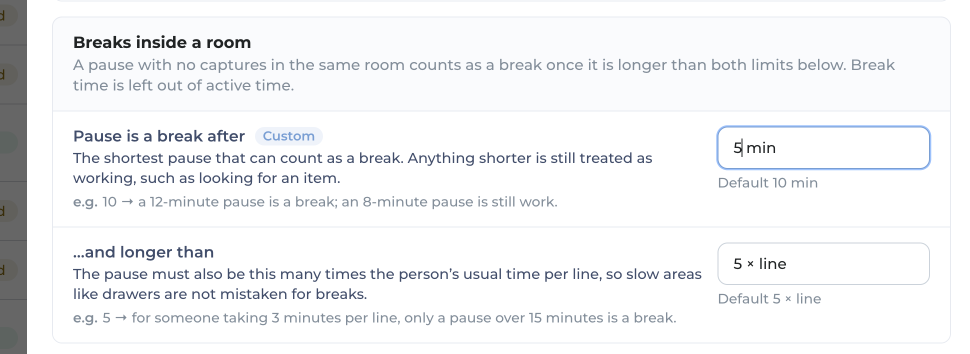
on the screenshot above5 minutes and REMOVE ...and longer than
Peter Stahl · 25 Sep · C0
- T6Set “Pause is a break after” to 5 min by default (now 10 min).change
- T7Remove the “…and longer than N × line” setting. A pause of more than 5 min is a break, whatever the person’s usual pace.remove
Room changesboth settings go
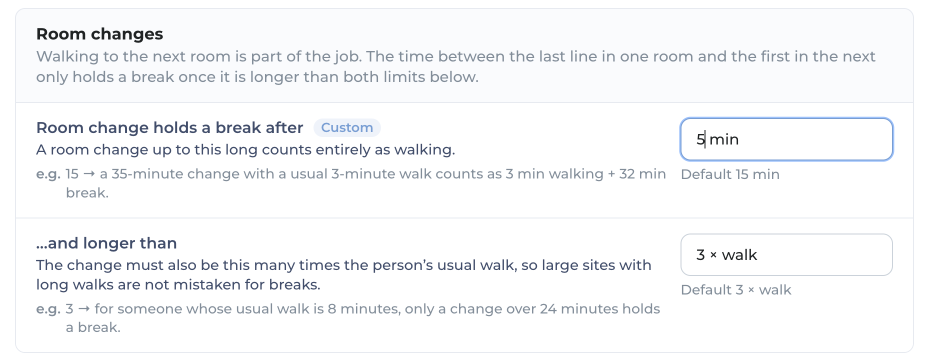
on the screenshot aboveCan be removed bc its redundant of the first one - we don’t care what they are doing during their “break”
Peter Stahl · 25 Sep · C1
- T8Remove the Room changes card and the rule behind it. The in-room rule (T6) covers it.remove
End of day & datatoday a day ends after 60 min with no captures
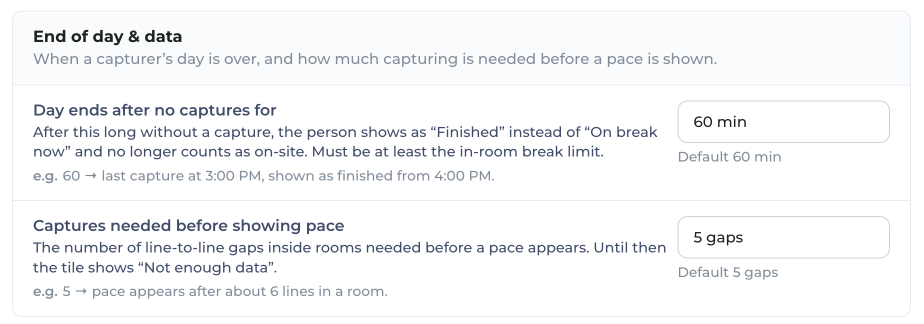
on the screenshot above1. There should be a We are done button on Dashboard somewhere
- no processing / WR done becomes UN GRAY when processes are completed and ready for reporting
2. All rooms market completed, no processing / WR done AND 60 minutes have passed
Captures Needed before showing pace change to 12
Peter Stahl · 25 Sep · C2
- T9Add a We are done button on the dashboard. It stays greyed out until nothing is still processing and WR is done, so the data is ready for reporting.Per capturer or per project is open (Q6).add
- T10End the day automatically once all rooms are marked complete, nothing is processing / WR is done, and 60 minutes have passed. This replaces “60 min with no captures”.change
- T11Set “Captures needed before showing pace” to 12 (now 5).change
Verdicts1.25×, 0.75× and 95% typed over 1.1×, 0.9× and 90%
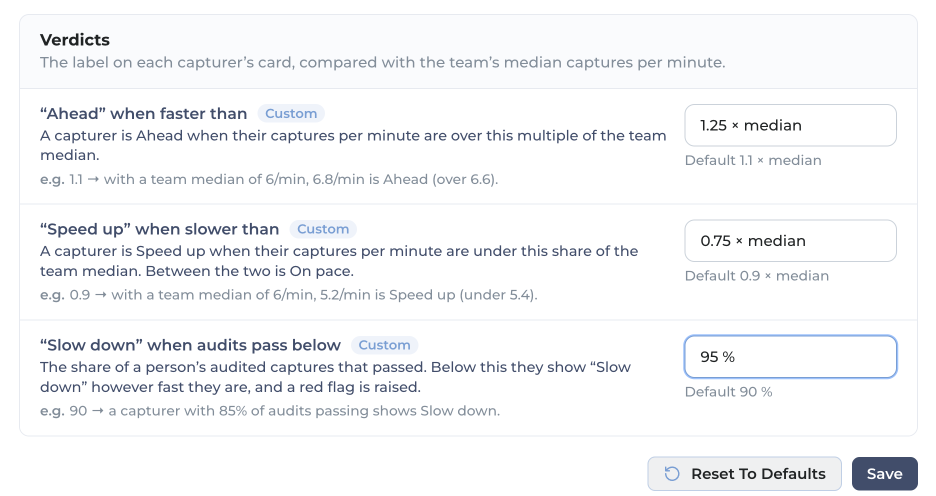
on the screenshot aboveUpdate the #s and for audits - If they miss 2 then vs slow down - Schedule check-in on quality concerns
Peter Stahl · 25 Sep · C3
- T12New verdict defaults: Ahead above 1.25 × median (now 1.1), Speed up below 0.75 × median (now 0.9), Slow down when audits pass below 95% (now 90%).change
- T13When a capturer fails 2 audits, show “Schedule check-in on quality concerns” instead of “Slow down”.How this sits with the 95% rule is open (Q7).add
Top barlive project tab · T14–T18


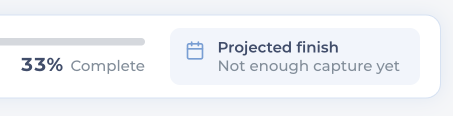

- T14Bug: “0 capturers on-site” should read 4.Cause: the count keeps only people whose last capture was within the 60-minute day-end limit. The fix counts today’s roster — see the top bar fix.bug
- T15Remove “33% Complete”.remove
- T16Remove “Projected finish”.remove
- T17Replace the stats line with:
0 of 1 departments complete | 3 of 9 locations complete | 136 captures | 70 SKUs | 1,212 EA | 2 of 4 Audits passed | 16 Audits pendingNew: departments complete, audits passed, audits pending. “6 remaining” goes, and SKUs move ahead of EA.change - T18Work out “Audits pending” from the team: every person needs 5 audits for GHX.In the example: 4 people × 5 = 20 needed, 4 done, 16 pending.add
on “16 Audits pending”Dynamic - Every person requires 5 audits for GHX
Peter Stahl · 25 Sep · C4
How each number in T14–T18 is worked out, and the exact patch for the API and the app: Top bar fix.
Team Performance panelT19
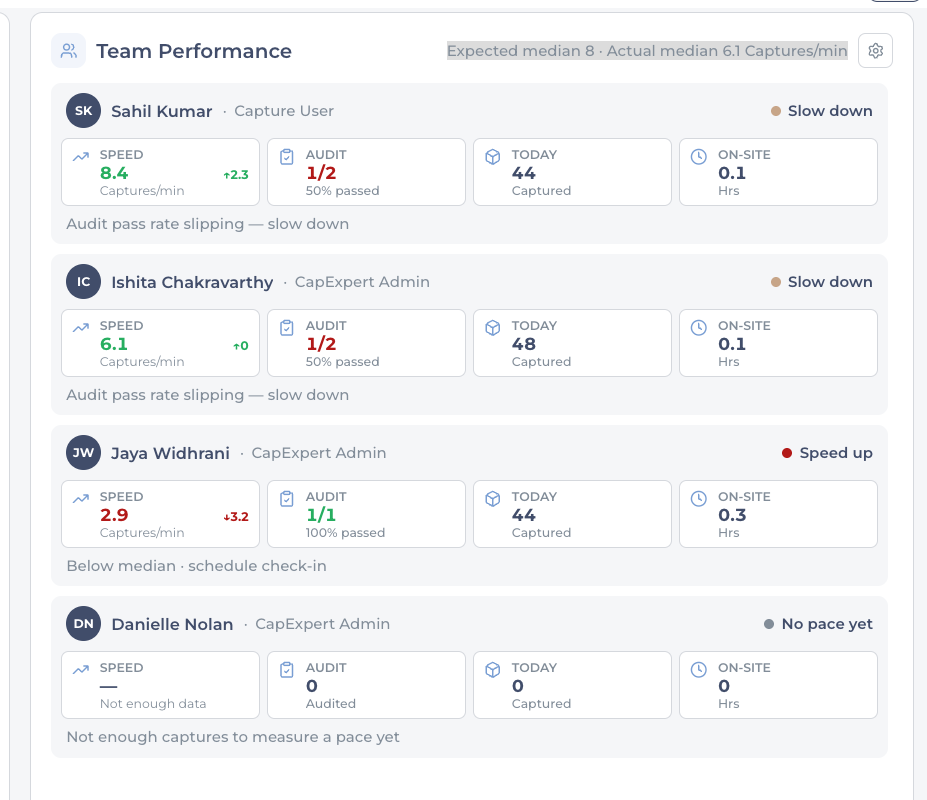
- T19Add team speed to the panel: 17 captures / min – 1,020 captures projected per hr, a trend that rolls up the individual speeds.Team speed is the sum of each person’s captures per minute (8.4 + 6.1 + 2.9 ≈ 17). Per hour is team speed × 60, worked out live. It probably takes the place of the highlighted “Expected median 8 · Actual median 6.1”.add
on “Team speed 17 captures / min”Sum of team members per min metrics
Peter Stahl · 25 Sep · C5
on “1,020 captures projected per / hr”17 x 60 min - dynamic
Peter Stahl · 25 Sep · C6
Capturer cardone per person · T20–T23
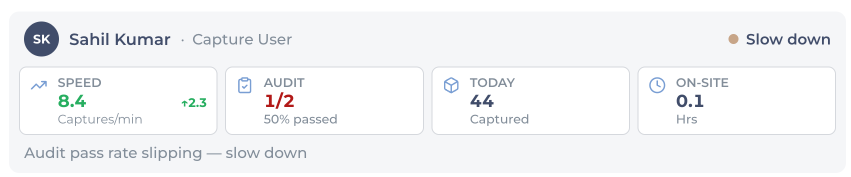
- T20Reorder the tiles: Speed, Captures, On-site, Audit.change
- T21Speed tile: change the text so it reads as active counting speed.No exact wording given.change
- T22Rename “Today” to Captures, shown as “44 today”.change
- T23On-site tile: show hours actively capturing against total hours.Every speed number is measured against active time. The Audit tile stays as it is.change
on “Active hours capturing* vs total hours”All metrics on speed are held against ACTIVE
Peter Stahl · 25 Sep · C7
Capturer detailopens from a card · T24–T31
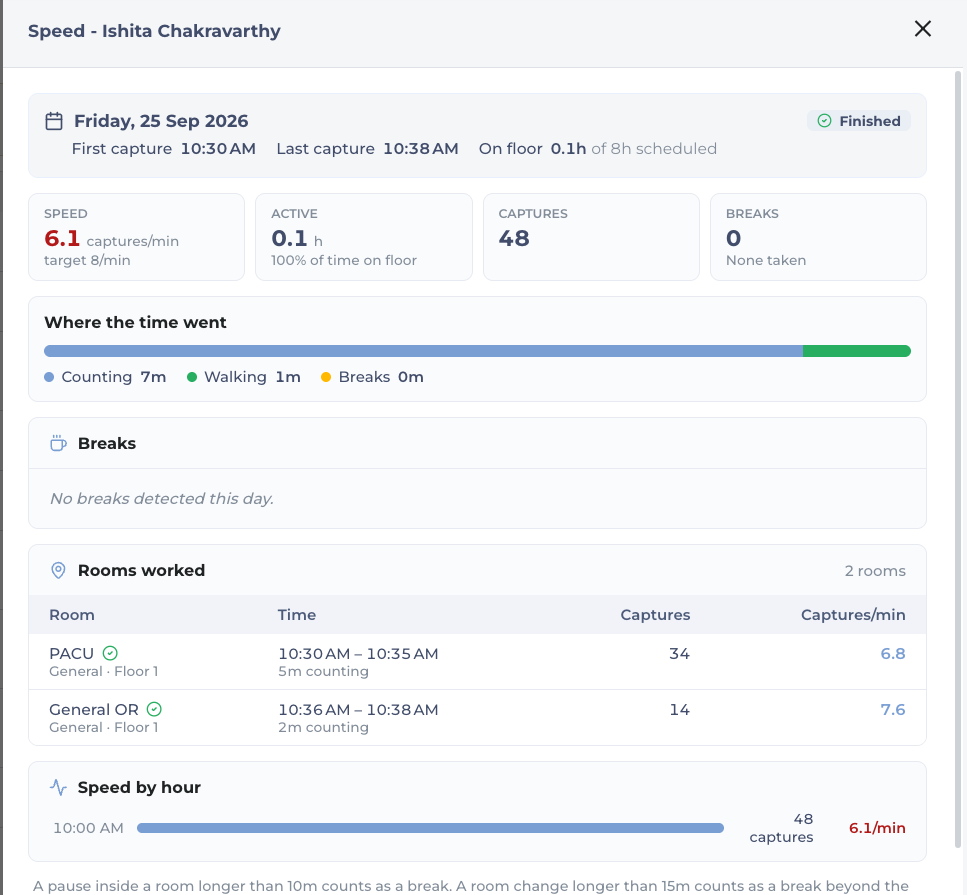
- T24Title: drop “Speed -” and show only the person’s name.change
- T25“On floor 0.1h of 8h scheduled”: make it clear whether that is active hours or total hours.change
on “On floor”Make this easy to understand if its active hours vs total hours there
Peter Stahl · 25 Sep · C8
Tiles and time barboth go

on the screenshot aboveRemove - Redundant of 1st screen
Peter Stahl · 25 Sep · C9

on the screenshot aboveRemove
Peter Stahl · 25 Sep · C10
- T26Remove the Speed, Active, Captures and Breaks tiles. They repeat the capturer card.remove
- T27Remove “Where the time went”.remove
Breaks become idle timeand the empty section needs an answer

on the screenshot aboveChange word from breaks to Idle time
-Lunch - Longest/max unique break
-Scheduled Breaks - 2nd Longest + 3rd longest SUM
-Other - All other breaks SUM
Peter Stahl · 25 Sep · C11
on the screenshot aboveWhere. did the break data go?
Peter Stahl · 25 Sep · C12
- T28Rename “Breaks” to Idle time and split it into three lines: Lunch — the longest single break; Scheduled breaks — the 2nd and 3rd longest, added together; Other — all the rest, added together.change
- T29Find out why the section says “No breaks detected this day” and answer “where did the break data go?”Check it against the current thresholds before treating it as a bug.answer
Rooms workedtwo things go
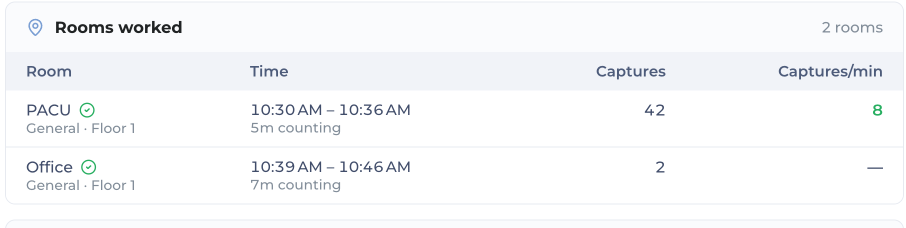
on the screenshot aboveRemove 5m counting
remove captures/min column
Peter Stahl · 25 Sep · C13
- T30Remove the “5m counting” line under each time, and the Captures/min column.remove
Speed by hourreplaced by a line chart

on the screenshot aboveRemove and replace
Peter Stahl · 25 Sep · C14
- T31Replace “Speed by hour” with a line chart: time on-site along the X axis, capture velocity up the Y axis, and the line turns yellow during idle time.The note under it quotes the old 10 min and 15 min rules, which T6–T8 retire.change
Day 2 feedbackafter the first day on site · T32
on the Team Performance panelthis dashboard was the most misleading of day - for day 2 be nice if this part was refreshed for starts so its blank for day 2, while all the other data stays (top bar and room data)
Day 2 feedback · 27 Sep
- T32Start the Team Performance panel blank each day: speed, hours on site, the Audit cell and the verdict cover today only. The top bar, the room list and the red flags keep the project to date.Cause and patch: Day 2 · team panel reset. Not applied yet.change
Questions to settlebefore building
Q1–Q5 are asked in the document and left open. Q6–Q10 come from reading the comments.
- Q1Does a locked phone count as not counting?
- Q2Does having another app open count?
- Q3Does a phone call count?
- Q4How is sync factored in?
- Q5How is offline mode factored in?
- Q6End of day (T9–T10): is “We are done” for each capturer, or for the whole project or day? What exactly counts as “processing / WR done”?
- Q7Audits (T12–T13): does “fails 2 audits” replace the 95% rule, or apply alongside it? Is “Schedule check-in on quality concerns” a verdict label or the note under the card?
- Q8Audit time (T4): “Audited 5 times … so” ends half way. What was the rest?
- Q9Camera idle (T2): 1.25 min is marked as a placeholder. What is the real number?
- Q10Audits pending (T18): is 5 audits per person only for GHX, or for every client?